
ChatGPT Voice Now Works Seamlessly Within Chat on All Devices
Introduction: The Next Step in Conversational AI
I still remember the first time I used a voice assistant at work. For me, there was a certain thrill in saying something out loud and watching technology respond, almost as if it were a living, breathing teammate. Over time, I became accustomed to toggling between modes—typing, clicking, speaking—and, frankly, I began to wish for something a tad more fluid. Today, that wish feels surprisingly close to reality. With the latest update from OpenAI, you (like me) no longer need to flip between classic chat and a special voice interface. ChatGPT Voice now functions right inside your chat window. This shift might sound small at a glance, but for anyone juggling conversations, tasks, and visual data throughout the day, it’s a real breath of fresh air.
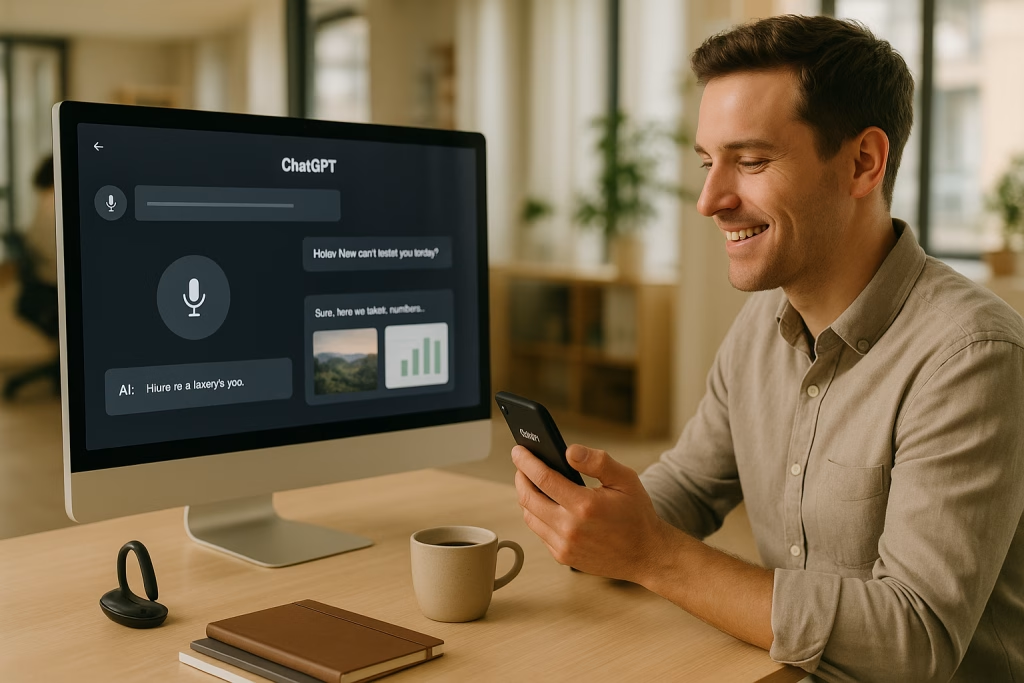
After updating to the newest version, I found the voice capability available both on my trusty laptop and my slightly battered smartphone. There was no need for labyrinthine menu diving or obscure settings. I simply tapped the mic, spoke my query, and saw the response roll onto my screen in real time. All the while, my previous messages and even interactive visuals—maps, photos—remained instantly accessible. It’s a tidy tapestry of features that quietly makes the experience much more streamlined.
In this post, I’ll guide you through the new features, explore the implications for business and personal productivity, and share practical tips I’ve learned while putting the system through its paces. By the end, you’ll see why this isn’t merely a technical update, but a real shift in how we work, communicate, and explore ideas day to day.
What’s New: ChatGPT Voice Right Inside Chat
OpenAI’s latest rollout eliminates friction: voice interaction is now part and parcel of the everyday ChatGPT chat window. I found that there was no longer any awkward switching between text and voice or any disjointed modes. Instead, voice input is available at the very heart of conversations, blending seamlessly with:
- Real-time responses—voice answers appear as you speak, almost like dictating to a highly attentive scribe
- Immediate visuals—charts, maps, images pop up in sync with queries, providing an instant context shift
- Full message history—previous exchanges remain at your fingertips, making it easy to reference or compare
This change now allows users to:
- Talk and type within the same session, without toggling modes
- See voice-generated answers rendered on-screen in real-time
- Effortlessly review earlier messages and cross-reference multimodal content
- Interact via voice on any device, mobile or web
Personally, this combination of voice, text, and rich media in one space feels like a small revolution (even if OpenAI would never call it that!). It’s one of those updates that, after a day of use, becomes almost invisible; you simply get things done faster.
How to Enable and Use the New ChatGPT Voice Feature
Step 1: Update Your App or Browser
It’s really as simple as it sounds. For me, all it took was a quick update in the App Store, and within moments, the voice icon appeared inside the familiar chat interface. On desktop, a refresh of the browser window did the trick.
- On mobile: Update the ChatGPT app from your device’s store (App Store for iOS, Google Play for Android).
- On web: Refresh your browser or clear cache if you’re not seeing the new option.
Step 2: Start Speaking Inside Any Chat
Here’s what struck me first: there’s no “voice mode” to select. Within every chat, a microphone icon appears, inviting you to speak at any moment. I noticed there was only the faintest delay before my spoken words started appearing as text, with the AI’s answer following almost immediately after.
- Tap (or click) the microphone icon in the chat input box.
- Begin speaking—your speech is transcribed and processed on the fly.
- View text responses and visual content alongside your voice prompts.
It felt almost as natural as speaking to a friend, albeit one who seems to have a photographic memory and an endless supply of facts.
Step 3: Review—Switch Between Voice, Text, and Visuals
What I particularly enjoy is the way everything—messages, visuals, even images the system generates—remains within one continuous timeline.
- Scroll up to reference past exchanges, whether they were typed or spoken.
- Tap on visuals to expand them or gather more detail.
- Continue the conversation in whatever format you prefer, without resetting the session.
I often find myself switching between talking and typing, depending on whether my hands are free or I’m sharing my screen during a meeting. The lack of interruption is, quite frankly, a delight.
Advantages of Integrated ChatGPT Voice
From my experience in consulting and working with entrepreneurs, time is a rare commodity. Every second spent toggling, switching apps, or repeating yourself can carry a cost—sometimes in lost information, sometimes in sheer frustration. The integrated ChatGPT Voice delivers several noteworthy benefits:
- Speed: Get answers while you talk. It’s genuinely faster compared to typing everything out (try dictating a tricky email—you’ll see what I mean).
- Accessibility: For anyone with physical or visual challenges when typing, voice input offers a real boost in productivity and independence.
- Multimodal Context: Having visuals and maps appear right alongside the conversation removes ambiguity—something I deeply appreciate when prepping reports or presentations.
- Continuity: No dropped threads or confusion when switching mode. The whole context is preserved, making collaboration smoother if you share transcripts or outputs later on.
- Device Flexibility: Whether at your desk, on the train, or pacing the living room with your phone, the experience remains consistent.
It feels rather like trading up from an old flip phone to a modern smartphone—suddenly, the tools get out of the way, letting you focus on the task at hand.
Why This Matters for Business and Sales Teams
In my consulting work, particularly with marketing and sales teams chasing tight deadlines, tools that save time (and sanity) gain quick traction. ChatGPT’s integrated voice feature has some particularly useful applications on this front:
Effortless Meeting Summaries and Note-Taking
I’ve often found myself capturing meeting highlights on the fly, either while walking back to my desk or during those hasty post-call debriefs. With this update, you can simply press the voice icon, dictate your summary as you remember it, and save the transcript—or ask ChatGPT to structure the notes for immediate sharing.
Rapid Customer Insights and Prospect Research
Sales reps can now query by voice for up-to-date information on leads, industries, or competitors, seeing results and related visuals almost instantly. When prepping for a pitch, this means less time scrolling and more time strategizing.
AI-Powered Brainstorming and Draft Creation
For content marketers, speaking prompts out loud often unlocks more ideas than typing ever does. I’ve found the seamless switch between drafting by voice and editing by text allows creative work to flow in an almost conversational rhythm.
Mobile Productivity Everywhere
Out on the road? I’ve finished writing up proposals and answering client queries from my phone, using voice to keep things moving even without a laptop—no more emailing myself reminders or struggling with tiny keyboards.
- Voice input streamlines the capture of ideas, data, and feedback at the moment they occur.
- Integrated visuals clarify strategy discussions, whether that’s a geographic sales map or a diagram pulled straight from question to answer.
- Conversational context preserved in one chat means a full audit trail for collaboration or follow-up.
Boosting Automation & AI-Driven Workflows With make.com and n8n
Oftentimes in my day-to-day, I see clients piecing together sprawling automation flows using tools like make.com and n8n. The crucial bottleneck? Capturing and moving data efficiently between platforms and people. With this new ChatGPT Voice feature fully integrated, these scenarios gain an extra layer of simplicity:
- Voice-Activated Triggers: Initiate workflows by speaking commands in chat—say, “Start sales follow-up sequence for client X,” and let your automations do the heavy lifting.
- Automated Transcription: Capture detailed meeting notes and send structured outputs directly to CRM, project management, or ticketing systems, simply by dictating inside your chat.
- Real-Time Updates: See dashboards, images, and maps update as you ask, making it easier to keep everyone aligned without endless email threads.
More than once, I’ve avoided missing critical action items by quickly recording details via voice while workflows push data downstream. It’s the kind of low-friction interface that, over a week or two, starts to feel indispensable.
Tips and Best Practices for Getting the Most From ChatGPT Voice
Not to put too fine a point on it, but a tool is only as useful as the habits you build around it. Here are some of my favourite tips to elevate your ChatGPT Voice experience:
- Speak Naturally: Don’t worry about perfect phrasing—the AI does a grand job of making sense of everyday language, regional accents, and, in my case, the occasional British-ism.
- Pause for Thought: Give yourself a moment to think before speaking, especially in fast-paced work settings. It cuts down on the “umms” and makes editing easier later.
- Switch Formats as Needed: I tend to brainstorm out loud and then shift to typing for polish. There’s no penalty for blending approaches.
- Use Visual Prompts: Ask for images, maps, or diagrams to accompany answers—particularly useful in marketing, sales mapping, or when explaining complex ideas to clients who „just need to see it.”
- Review and Edit: Before sharing outputs, skim over transcripts or generated content for accuracy. Sometimes a quick tweak goes a long way.
- Leverage History: Use the preserved conversation context to build multi-part projects or ongoing collaborations. I’ve stitched together entire marketing campaigns in one long chat session before exporting the transcripts for implementation.
Security, Privacy and Responsible Use
As someone who’s managed client data and sensitive conversations, I always advise a measure of caution. OpenAI’s platform does employ robust security standards, but it’s still wise practice to keep confidential information out of general conversations or confirm compliance with your organisation’s data policies.
- Review privacy settings regularly to ensure you’re in line with organisational standards.
- Use voice input judiciously in open-plan offices or public spaces; headphones with a built-in mic make a world of difference.
It’s worth saying out loud—pun intended—that AI should be a supplement, not a substitute, for professional judgment and critical thinking.
My Impressions After Two Weeks With The New Voice Integration
If you’ve read this far, you’ll know I’m something of a fan. From my personal workflow to client projects, I’ve noticed a few key impacts:
- Less friction when moving between solo work and team conversations—the chat window adjusts to my needs, not the other way around.
- Greater accessibility for colleagues with disabilities—voice provides a crucial new route to participation.
- More spontaneous problem-solving and creativity, since speaking is sometimes a quicker path from idea to action than typing.
- Real-time collaboration—I’ve brainstormed with teammates while walking outdoors, coordinating marketing strategies in real time, all hands-free. That would have sounded wild just a few years back.
Honestly, it’s the sort of low-effort, high-return improvement that makes tech feel genuinely helpful. And, occasionally, I get a chuckle from puzzling the dog with my impromptu meetings—though he hasn’t yet understood the appeal of “prompt engineering.”
Use Cases Across Sectors: From Marketing to Daily Life
It astounds me how many corners of business and personal productivity this feature touches. Let’s look at a few standout areas:
Marketing and Creative Teams
- Draft campaign ideas by voice, then polish copy with text edits.
- Generate and discuss visuals or charts in the flow of conversation.
- Review client feedback out loud while analysing responses on-screen.
Sales Organisations
- Prepare for meetings by reviewing prior dialogue (spoken or typed) in a single timeline.
- Dictate opportunity notes or customer updates on the go, ensuring nothing slips through the cracks.
- Share voice-generated summaries or action items in team chats, keeping everyone in the loop without drafting endless emails.
Small Business Owners & Entrepreneurs
- Set up reminders, log expenses, or capture spark-of-the-moment ideas effortlessly via voice.
- Query for business trends, competitor insights, or even create briefing packs for investor meetings—all hands-free.
Personal Productivity & Everyday Life
- Shop for groceries, plan travel, or draft a family calendar while doing the school run.
- Organise thoughts for self-improvement or studies in a digital ‘notebook’ you simply talk to.
- Explain homework, clarify recipes, or guide a home repair—helpful in those “how do I fix this?” moments.
The Future of AI Chat Experiences: Where Are We Heading?
It’s difficult not to look at this update and imagine what’s to come. As AI assistants integrate more naturally into our working and personal routines, the lines between voice, image, and text continue to blur. I expect we’ll soon see:
- Improved Voice Recognition across wider accents and languages
- Real-Time Visual Collaboration—think: editing diagrams together in-chat, or adjusting data visuals with a spoken command
- Advanced Memory and Context Tracking so conversations can span weeks or months and remain coherent
- Greater Integration With External Tools like CRMs, ERPs, or creative software suites, all via natural conversation
This isn’t wishful thinking; it’s a logical progression, especially as underlying models become more capable and responsive. The trick, as always, will be to keep the interface intuitive—a reliable companion, not an obstacle course of options.
Getting Started: Quick Checklist
If you’ve not yet tried ChatGPT’s new voice feature, here’s a handy little list to get you moving:
- Update your ChatGPT app or refresh your web session to access the voice capability.
- Familiarise yourself with the interface—look for the microphone icon within any chat window.
- Test simple voice prompts for search, brainstorming, or review tasks.
- Invite feedback from your team—often, fresh eyes spot new ways to use a feature that you might miss.
- Experiment with visual queries—ask for maps, diagrams, images and integrate the answers into your workflow.
- Explore possible automation triggers if you use make.com or n8n to supercharge your business processes.
Practical Reflections: Is It Worth Embracing?
Over the last fortnight, my initial curiosity about ChatGPT’s voice integration faded quickly—replaced by a kind of quiet reliance. I found myself surprised by how quickly I stopped thinking about “using a new feature” and started thinking about “getting things done,” without the old interruptions. In marketing and sales, where every minute and every detail can make the difference, that’s an edge you don’t want to overlook.
Of course, the technology isn’t perfect. Sometimes, background noise muddles a command; occasionally, complex visual requests trip up the system. But on the whole, it’s as if the wall between thought and action is thinning—and anything that lets me capture insights, share briefs, or solve problems on the fly is a welcome addition to the kit.
In Closing: ChatGPT Voice, Now Simply Part of the Conversation
No grand pronouncements here—just this: integrating voice directly within ChatGPT chat is a natural evolution. It bends the experience toward convenience, inclusivity, and flexibility, putting text, speech, and visual cues at your fingertips in a way that feels effortless.
For those in business, sales, or marketing looking to draw every last bit of value from their tools, it’s an upgrade well worth exploring. And for the rest of us—well, anything that lets us spend less time fiddling with settings, and more time thinking, speaking, and acting, is bound to win a place in our day.
If you haven’t given it a go yet, update your app, tap that microphone, and see where your next conversation takes you. If you’re anything like me, you’ll wonder how you ever did without it.
Written by a member of Marketing-Ekspercki, passionate about making the most of AI—and getting a bit cheeky with tech, whenever possible.